Push-style portal inbox
Urgent alerts, unread filters, toast popups, and bulk actions keep club staff moving instead of chasing updates manually.
This is where the club side becomes clear: NXI Assist, permissions, travel, training, equipment, fundraising, sponsorship, Media Studio, payments, automatic match reports, Season Replay movies, and matchday workflows all working inside one platform instead of separate tools.
Urgent alerts, unread filters, toast popups, and bulk actions keep club staff moving instead of chasing updates manually.
Admins and treasurers can see assignment changes, reminders, and workflow movement across the club in one running feed.
Equipment issues now support workflow updates, evidence files, owner tracking, and reminder flows inside the same operating system.
Clubs can run direct campaigns, transparent allocations, approved sponsorships and ticketed events with Stripe-backed checkout flowing into the same platform.
Club admins control the full workspace while managers receive a narrower view of only the teams and actions assigned to them.
Illustrative team sheet, competition and mobile previews. Club names, results and figures are demonstration data.
Set each team from 5-a-side through 12-a-side and NEXTXI shows only the formations and number of starting positions that fit. Change the format as a team progresses without altering its published history.
See the team-size guide See the team-sheet guideInvite other NEXTXI teams, add external opponents, connect fixtures and keep previous seasons available as part of the club and player story.
See the competition guideSquad, fixtures, attendance, line-up, travel, stats and messages for the assigned team.
Role scopedAdmins get a focused club view for today and this week. Managers see only their assigned teams and the matchday actions they are authorised to complete.
See the mobile access guideMatches, training and club events
Bring Going, Maybe and Not going responses into the same workspace as your fixtures, training and club events. Authorised coaches and managers can review names and totals before the day.
See how availability replies workFirst team vs Riverside FC
Example responses to a scheduled match. Each reply stays editable while responses are open.
Players and eligible coaches, managers and staff can respond to each scheduled match, training session or club event available to them.
Parents and guardians can respond for each linked child, keeping every player's plans clear even when the family has more than one team.
Authorised coaches and managers can see response totals and names. People can change their reply while responses are open.
Available on the web, iOS and Android, with English and Welsh language options.
Grassroots football session planning
Prepare a whole-session draft with NXI Assist in your existing Training workspace. Review the activities and timings, add temporary groups and coaching responsibilities, then publish for players and linked parents.
Choose activities → organise groups → preview → publish.
Explore the training plannerIllustrative session programme
Coach plan • Private draftU12 • Shared training date
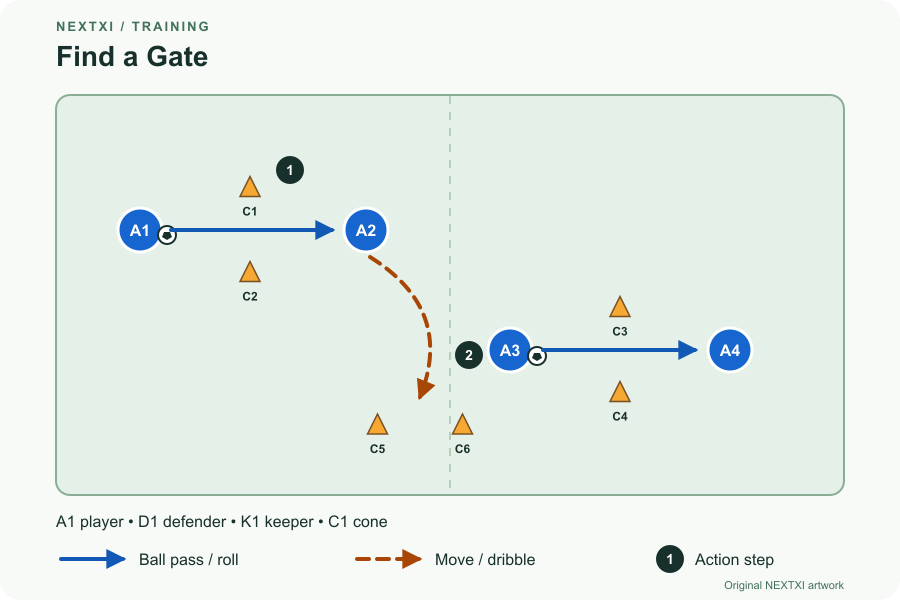
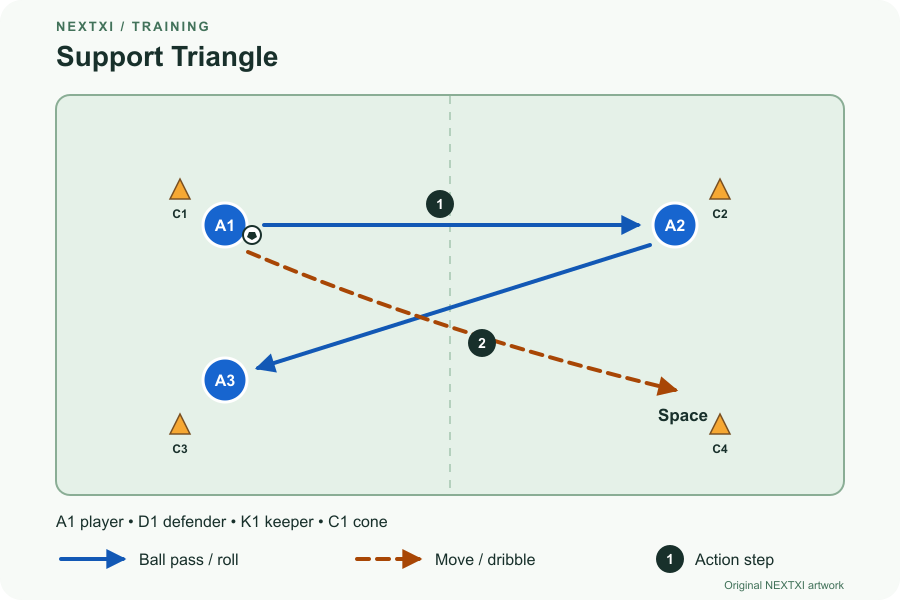
Both stations share one 12-minute block in the programme.
Illustrative session, groups and coach labels. Activity diagrams are original NEXTXI content.
Choose from 68 original activities with English and Welsh instructions, diagrams, coaching points and easier or harder variations. Adapt a copy for your players.
Set parallel stations and temporary groups, give every coach a role, and separate what players arrive wearing from the bibs you provide.
Publish each linked child's practical instructions while coaching notes stay private. Viewing a plan and confirming availability remain separate actions.
Club membership management
Give authorised staff a central ledger for paid, unpaid and overdue membership fees, with a linked family view so parents can see what each child owes.
Explore season memberships & paymentsCollect through the club's connected Stripe account. Staff with cash permission can record received payments with the amount, date and an audit history.
Parents see fees for their linked children, including the amount and payment status. If online collection is not ready, the fee stays visible with guidance to contact the club.
Filter outstanding fees and send reminders. Payment status does not automatically block player selection.
Club membership fees are separate from your NEXTXI software subscription. Online collections carry a 5% NEXTXI platform fee plus Stripe processing charges. See pricing.
Club Passport brings together the club's history and identity. Player Passport is the individual player's football record.
Fixtures, results, awards, people and archive stories flow from the operational workspace into a lasting club identity—without committees rebuilding the same history in another system.
Access and retention depend on your club relationship and account. How records are kept.
NEXTXI separates the operational workspace from a deliberately limited public snapshot, giving club admins control without exposing family or player records.
Illustrative website and theme builder. Club names, fixtures and figures are demonstration data.
Registrations, medical information, family details, attendance and private messages never become part of the public website.
Every player. Every game. Every story.
View fixturesSaturday · Home ground
All fixtures →Club administrators and treasurers get a live view of campaign progress, verified support, agreements and upcoming renewals without exposing money controls to the client.
Example fundraising dashboard. Campaigns, sponsor names and totals are demonstration data.
Help give every age group safer, better training equipment.
North East MotorsApproved placement
Create a clear campaign story, target and public support page with privacy controls and a live verified total.
Show supporters exactly how contributions will be used. Every allocation must add up to 100% before publishing.
Credit the player, team, fixture or event that inspired the support while keeping every contribution owned by the club.
Connect a fixture to a designated club project or a fixed, pre-agreed split that never changes with the result.
Build packages, approve sponsor profiles, track placements and keep active agreements together instead of across spreadsheets.
Bring renewal dates, contribution records, QR tools and sponsor value reporting into the same accountable workspace.
Direct contributions and approved sponsorship only. No betting, lotteries, raffles or prize-draw mechanics.
The Media Studio uses the club's approved sponsor artwork to build branded team and player backdrops directly inside the NEXTXI mobile workflow.
Illustrative Media Studio preview. Player and sponsor names are demonstration data.
Landscape camera layouts keep the whole squad centred inside a consistent club frame.
Approved club or individual player sponsors appear in the correct media layout.
For player portraits, NEXTXI removes the background securely and keeps the source image in memory only.
Fine-tune player size and position, then export a high-resolution finished image.
NXI Assist helps authorised club administrators find the next fixture, a missing registration or an attendance concern using the information in their workspace.
In Training, authorised coaches can give NXI Assist the focus, age group and available resources, then review a timed programme from existing drills before applying and publishing it.
Bring fixtures, training, events and outstanding work into an admin priority list.
Ask about registrations, attendance, staff, equipment, payments, awards and the squad.
Answers use the NEXTXI workspace information available to the administrator.
Illustrative example · demonstration data
What needs my attention today?
Three player registrations need review before Friday.
U14 training starts at 18:00 tonight.
The first team fixture is Saturday at 14:00.
Open NXI Assist from the admin workspace header.
Attach travel arrangements to the fixture with the meeting point, meeting time, away-day notes, and the transport brief for the squad.
Parents or approved drivers can confirm if they are driving and exactly how many seats they have available.
The dashboard flags unassigned players so staff can allocate seats and make sure nobody is missed before kickoff.
Live visibility for equipment operations instead of guesswork before matchday.
Live visibility for equipment operations instead of guesswork before matchday.
Live visibility for equipment operations instead of guesswork before matchday.
Control teams, staff, payments, subscriptions, archives, restorations, and the wider operating flow.
Work through assigned teams with the right permissions instead of seeing the whole club by default.
Claim linked access by email and drop straight into the right player or family view without manual stitching.
Staff, parents, players, and club roles connect to real records and team scope instead of everyone seeing the same data by default.
So clubs can run the wider community side without leaving the platform.
So clubs can run the wider community side without leaving the platform.
So clubs can run the wider community side without leaving the platform.
So clubs can run the wider community side without leaving the platform.
Compare Starter, Growth and Academy plans for your club.
Every team. Its own voice. One place to plan it.
Give club administrators a shared publishing workspace without mixing up team accounts. Prepare matchday updates, approved photos and videos, then publish now or choose a future date and time.
Ahead of the weekend
Your Saturday starts here.
Facebook + X
The week in training.
Instagram Reel
A season worth remembering.
YouTube video
Separate team accounts. Clear dates. A status for every destination.
The right account for each team
Assign official profiles to the First Team, academy or junior squads. Choose exactly which connected accounts receive each post.
Ready before the whistle
Keep drafts, schedule approved content and track published, failed or needs-attention posts. Edit, reschedule or cancel before publishing starts.
Bring supporters to your socials
Optionally show selected team social links on your NEXTXI club website. Preview the matching team cards, then publish when you are ready.